
TL;DR
Moving a Helm chart suite from vanilla Kubernetes to OpenShift is not a lift-and-shift — and a production deployment for an enterprise customer on OpenShift 4.18 made that very clear, very fast. This post documents seven patterns applied to an on-premises agent platform with 10+ services: a platform value layer that isolates OpenShift overrides, restricted-v2 security context helpers (with explicit UID/GID validation), runtime CA injection via init containers, an umbrella + library chart architecture, Kyverno ClusterPolicies as cluster-level enforcement, a 4-layer Argo CD value composition strategy, and — newest — migrating Python-built Job specs into Helm-owned CronJob templates with a transitional ConfigMap bridge. The goal throughout: one portable chart, multiple platforms, no Dockerfile forks, no application code that knows what OpenShift is.
”It Works on kind” — Until a Real Enterprise Cluster
I’ve heard “it works on kind” explain away more production incidents than I care to count. You spend weeks building a Helm chart suite, everything passes local tests, and then you drop it into an OpenShift 4.x cluster and half your pods are stuck in CreateContainerConfigError. Security Context Constraints reject your init containers. Your CA trust assumptions break because the cluster uses an internal PKI. Your batch Jobs don’t meet the namespace’s Pod Security Admission policy.
Before we get into the patterns, one thing shapes everything here: this chart is a product, not internal tooling. It’s shipped to enterprise customers and installed on their own infrastructure — on-prem clusters and cloud-native platforms managed by their own infra teams. That means we don’t own the cluster. The customer’s infra team decides what SCC profile is enforced, what UID ranges are allocated per namespace, whether Argo CD is in the picture at all. The chart has to work on their terms. That constraint is why several of these patterns exist in the form they do.
Then a real enterprise customer arrives — running OpenShift 4.18 with a 4.20 rollout in progress — and the requirements crystallize fast: explicit UID/GID allocation (not OpenShift’s random assignment), image scanning, NFS storage, internal proxy for outbound traffic, and a CA model that doesn’t hard-code certs in images. Each of these had a pattern behind it. This post is that collection.
OpenShift is not just Kubernetes with a different logo. It’s Kubernetes with strong opinions — and those opinions are enforced at the API server level, not just at review time.

Pattern 1: The Platform Value Layer
The worst thing you can do when adapting a chart for OpenShift is scatter {{- if eq .Values.global.platform "openshift" }} conditionals across 20 templates. You end up with templates nobody dares touch and overlays that are impossible to reason about.
The better approach: introduce a single platform gate in your base values and isolate every OpenShift-specific override in a dedicated value file.
# deployment/values.yaml — base, platform-agnostic
global:
  K8S_PLATFORM: kubernetes
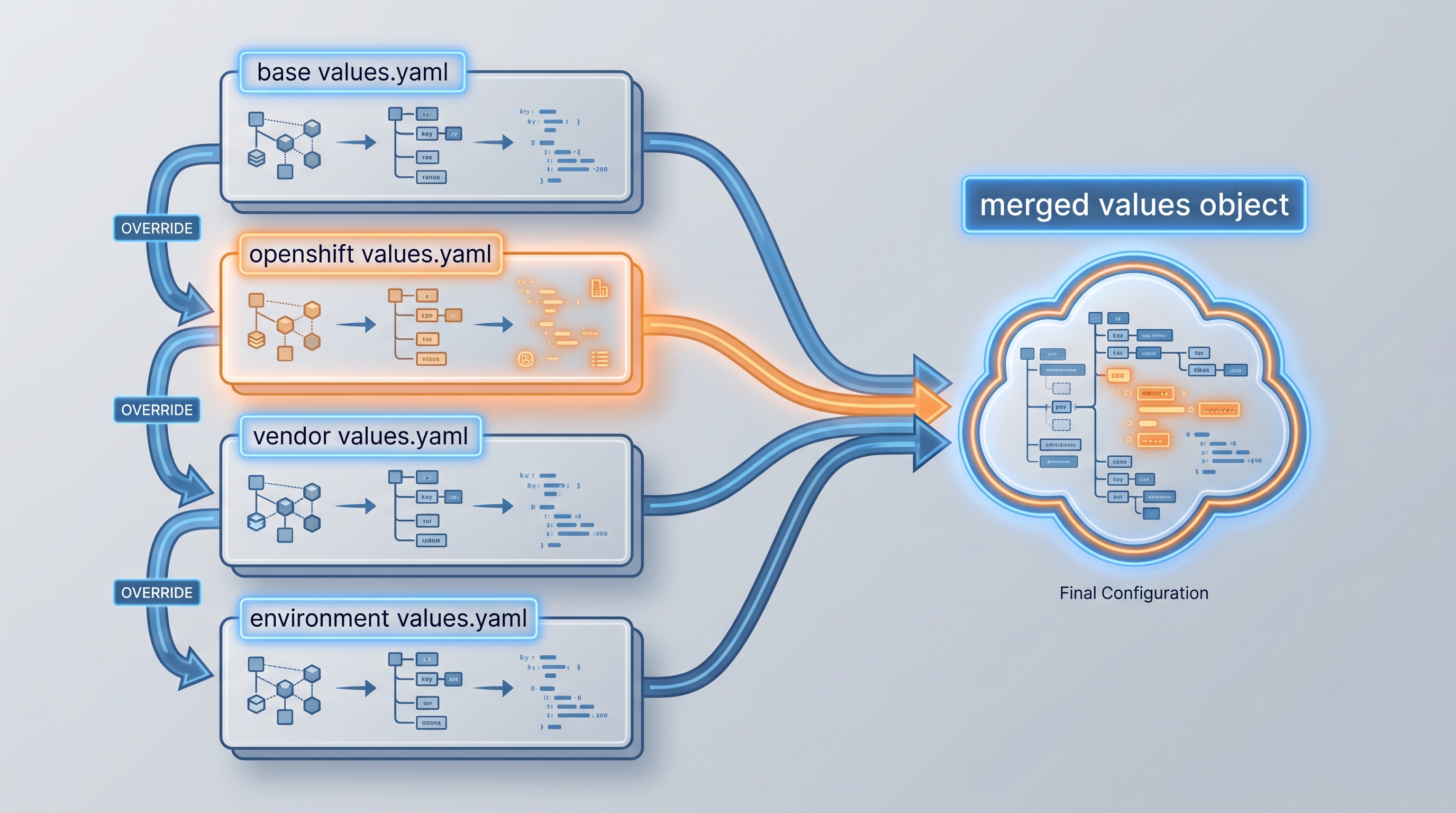
Apply value files in a strict order — later files override earlier ones:
deployment/values.yaml                           # base defaults
deployment/openshift/values.yaml                 # sets K8S_PLATFORM, SCC values, StorageClass
deployment/openshift/vendor/values.yaml          # vendor overlay: registry, org-specific tunables
deployment/openshift/vendor/staging/values.yaml  # environment: replica counts, secret refs
In Helm templates, branch on the platform gate through a single helper so the condition stays consistent:
{{- define "libchart.isOpenShift" -}}
{{- eq .Values.global.K8S_PLATFORM "openshift" -}}
{{- end }}
The openshift/values.yaml file becomes a first-class artifact — reviewable in isolation, easy to diff between environments. When a new OpenShift-specific requirement appears (our customer added NFS StorageClass and proxy env vars in the same overlay), you change one file.
Pattern 2: restricted-v2 Security Contexts via Library Chart Helpers — With Explicit UIDs
What is restricted-v2? It’s OpenShift’s strictest built-in Security Context Constraint (SCC) — the Pod Security Admission profile enforced by default on most namespaces. A pod that doesn’t satisfy it is rejected at the API server before it ever schedules. Because this chart is installed on customer-managed clusters, we don’t choose whether restricted-v2 is enforced — the customer’s infra team does. What the chart controls is the UID range:
global.openshiftRunAsUserandglobal.openshiftRunAsGroupare chart values, configurable per deployment via the OpenShift overlay. Two levers enforce compliance: Helm templates (correctsecurityContextfields in libchart helpers — every rendered workload is compliant at deploy time) and Kyverno ClusterPolicy (intercept at admission regardless of how the pod arrived — GitOps,kubectl apply, or service code). The right answer is both: Helm so the chart is correct by default, Kyverno as the safety net for what Helm doesn’t render.
OpenShift’s restricted-v2 profile enforces rules that most public Helm charts ignore:
runAsNonRoot: trueallowPrivilegeEscalation: falseseccompProfile.type: RuntimeDefaultcapabilities.drop: [ALL]- UIDs must fall within the namespace’s
openshift.io/sa.scc.uid-rangeannotation
The UID requirement is where most charts silently break — and enterprise customers add a twist. OpenShift by default allocates a UID from the namespace range automatically if you omit runAsUser. That works for most clusters. Our customer’s requirement was explicit: “Make sure the pod uses the default uid/gid” — meaning a fixed, predictable UID that falls inside the range, not a randomly allocated one. For image scanning and audit trails, random UIDs are a problem.
The pattern: run validate-uid-range.sh against the target namespace to read the allocated range, then pin the low bound in your OpenShift value overlay.
#!/usr/bin/env bash
# deployment/openshift/validate-uid-range.sh
# Usage: ./validate-uid-range.sh <namespace>
NAMESPACE=${1:?usage: $0 <namespace>}
RANGE=$(oc get namespace "$NAMESPACE" \
  -o jsonpath='{.metadata.annotations.openshift\.io/sa\.scc\.uid-range}')
LOW=$(echo "$RANGE" | cut -d/ -f1)
echo "Namespace $NAMESPACE uid-range: $RANGE"
echo "Set in values: global.openshiftRunAsUser: $LOW"
echo "              global.openshiftRunAsGroup: $LOW"
Wire the output into your OpenShift overlay:
# deployment/openshift/values.yaml
global:
  K8S_PLATFORM: openshift
  openshiftRunAsUser: 1000900000   # low bound of namespace uid-range
  openshiftRunAsGroup: 1000900000
Then define two helpers in your library chart:
{{- define "libchart.podSecurityContext" -}}
runAsNonRoot: true
{{- if .Values.global.openshiftRunAsUser }}
runAsUser: {{ .Values.global.openshiftRunAsUser }}
runAsGroup: {{ .Values.global.openshiftRunAsGroup }}
fsGroup: {{ .Values.global.openshiftRunAsUser }}
{{- end }}
seccompProfile:
  type: RuntimeDefault
{{- end }}

{{- define "libchart.containerSecurityContext" -}}
allowPrivilegeEscalation: false
capabilities:
  drop:
    - ALL
seccompProfile:
  type: RuntimeDefault
{{- end }}
Every Deployment, Job, and CronJob template calls these helpers. One change propagates everywhere. When openshiftRunAsUser is unset (vanilla Kubernetes), the UID block is omitted entirely. Do not repeat this block in individual subchart templates — that is how drift happens, and drift is how you get a 3am incident when a batch Job fails its SCC check on its first scheduled run.
Pattern 3: Runtime CA Injection — From Entrypoint Script to Init Container
This one has a before and after worth explaining, because we lived through the transition.
The original approach baked the certificate into the container image. Each service image (linta, pm-connectors, sensors) shipped an entrypoint.sh that ran update-ca-certificates at container start using a cert that was COPY-ed in during the build. It worked in a controlled environment where you owned the image pipeline and the cert changed rarely. It broke the moment we were shipping to customer clusters: different customers have different CAs, certs rotate on schedules you don’t control, and enterprise security teams have opinions about what goes inside an image.
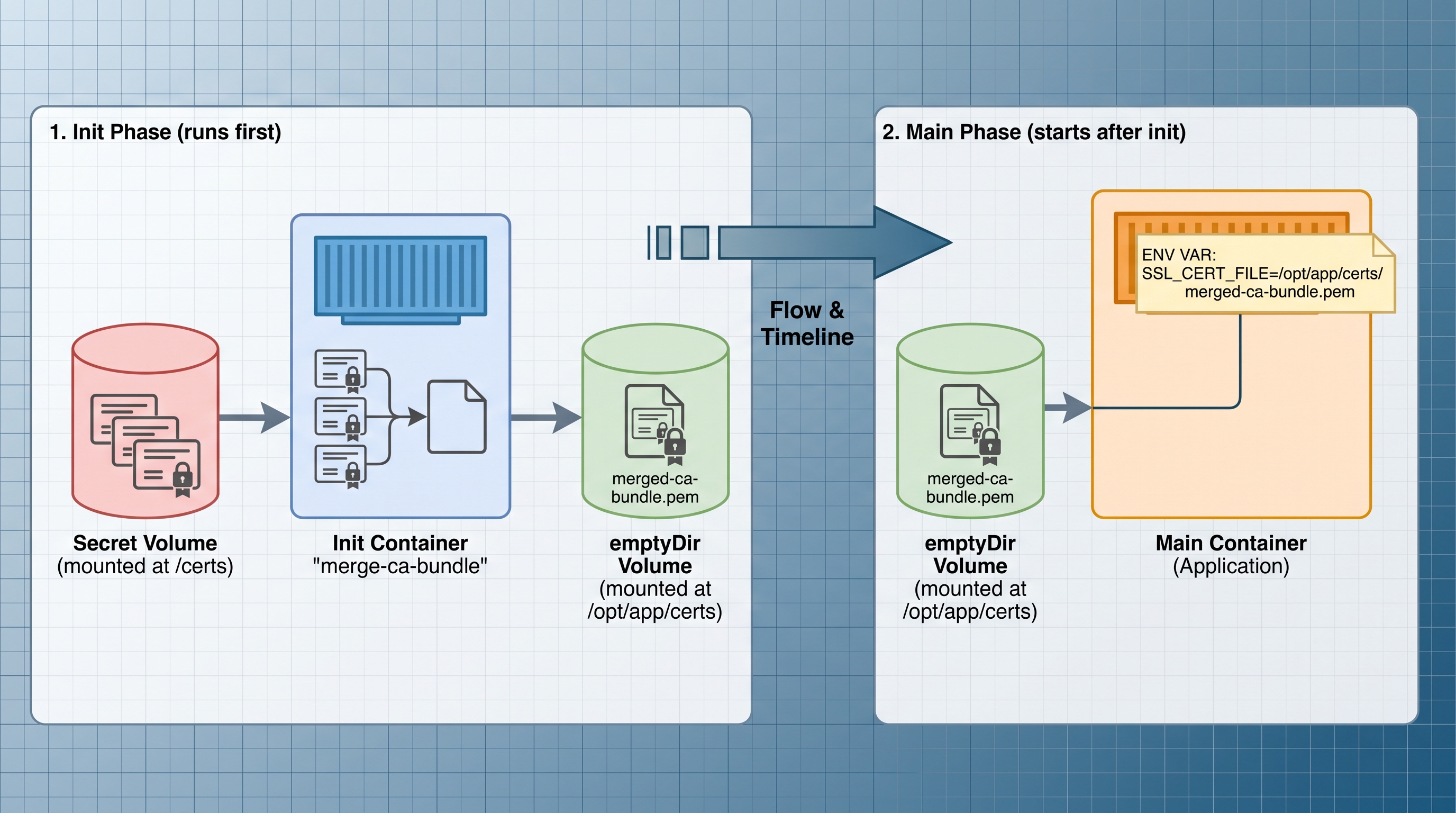
The fix was to move cert injection entirely out of the image and into the deployment. The entrypoint.sh became a simple command pass-through — no cert logic at all. Instead, a Helm-controlled init container (merge-ca-bundle) runs at pod startup, reads the customer’s CA from a Kubernetes Secret, merges it with the system CA bundle into a shared emptyDir volume, and the main container starts with SSL_CERT_FILE, REQUESTS_CA_BUNDLE, and CURL_CA_BUNDLE all pointing at the merged PEM. No cert in the image. No rebuild on rotation. No customer-specific Docker tags.
The correct pattern: inject the CA at pod startup via a Helm-controlled init container.
# libchart/_deployment.yaml (and _jobPodTemplate.yaml for batch parity)
{{- if eq .Values.global.CUSTOM_ROOT_CERTIFICATES "true" }}
initContainers:
  - name: merge-ca-bundle
    image: {{ .Values.global.initImage }}
    securityContext: {{- include "libchart.containerSecurityContext" . | nindent 6 }}
    command:
      - sh
      - -c
      - |
        cat /etc/ssl/certs/ca-certificates.crt /certs/custom-ssl.crt \
          > /opt/app/certs/ca-bundle.pem
        chmod 644 /opt/app/certs/ca-bundle.pem
    volumeMounts:
      - name: custom-ca-secret
        mountPath: /certs
        readOnly: true
      - name: ca-bundle
        mountPath: /opt/app/certs
volumes:
  - name: custom-ca-secret
    secret:
      secretName: {{ .Values.global.customCa.secretName | default "certs-secret" }}
  - name: ca-bundle
    emptyDir: {}
{{- end }}
The main container receives three environment variables pointing at the merged PEM:
env:
  - name: SSL_CERT_FILE
    value: /opt/app/certs/ca-bundle.pem
  - name: REQUESTS_CA_BUNDLE
    value: /opt/app/certs/ca-bundle.pem
  - name: CURL_CA_BUNDLE
    value: /opt/app/certs/ca-bundle.pem
How the Secret gets into the cluster is controlled by a single enum — global.customCa.secretMode:
manual: The chart creates theSecretfrom a PEM value passed at deploy time, or an operator pre-creates it.eso: The chart renders anExternalSecret; the External Secrets Operator syncs the cert from Vault or AWS Secrets Manager.
Both paths converge on the same Secret shape: name certs-secret, key custom-ssl.crt. The init container never needs to know which path provisioned it.
One gap that surfaced in production: our customer’s PKI team distributes CAs through a ConfigMap pipeline, not a Secret. The chart currently only supports Secret. The bridge until native configMap secretMode lands:
kubectl create secret generic certs-secret \
  --from-file=custom-ssl.crt=<(kubectl get cm ca-bundle -o jsonpath='{.data.ca\.crt}')
It’s a one-liner, but it’s a gap worth knowing about upfront — and worth tracking as a chart enhancement for enterprise environments.
Pattern 4: Umbrella Chart + Library Chart as the Leverage Point
When you have 10+ services that all need identical OpenShift treatment, the umbrella chart + library chart combination is the architecture that makes this maintainable.
The umbrella chart declares all services as Helm dependencies. The library chart defines shared helpers for security contexts, CA injection, image references, and pod templates. When OpenShift adds a new requirement — say, adding seccompProfile to all containers — you update one helper and every workload picks it up on the next helm dependency update.
Optional platform-specific components use Helm’s condition: field:
# Chart.yaml
dependencies:
  - name: kyverno
    version: "3.2.x"
    repository: "https://kyverno.github.io/kyverno"
    condition: kyverno.enabled
  - name: external-secrets
    version: "0.9.x"
    repository: "https://charts.external-secrets.io"
    condition: external-secrets.enabled
  - name: agent-tasks
    version: "0.1.x"
    repository: "file://../agent-tasks"
    condition: agent-tasks.enabled
kyverno.enabled: false in your base values means vanilla Kubernetes deployments never see it. kyverno.enabled: true in your OpenShift overlay and it installs as part of the same Argo CD sync. One chart, multiple platforms.
Pattern 5: Kyverno as Cluster-Level Policy Enforcement
Here’s the honest reason Kyverno is in this chart: one of the services creates batch Jobs at runtime by calling the Kubernetes API from Python code. Those Job manifests were built programmatically — not rendered by Helm. Which means Helm templates couldn’t enforce securityContext on them. I didn’t want to re-implement the full restricted-v2 field set inside Python job-spec functions, and I didn’t want those functions to know anything about what OpenShift platform they were running on.
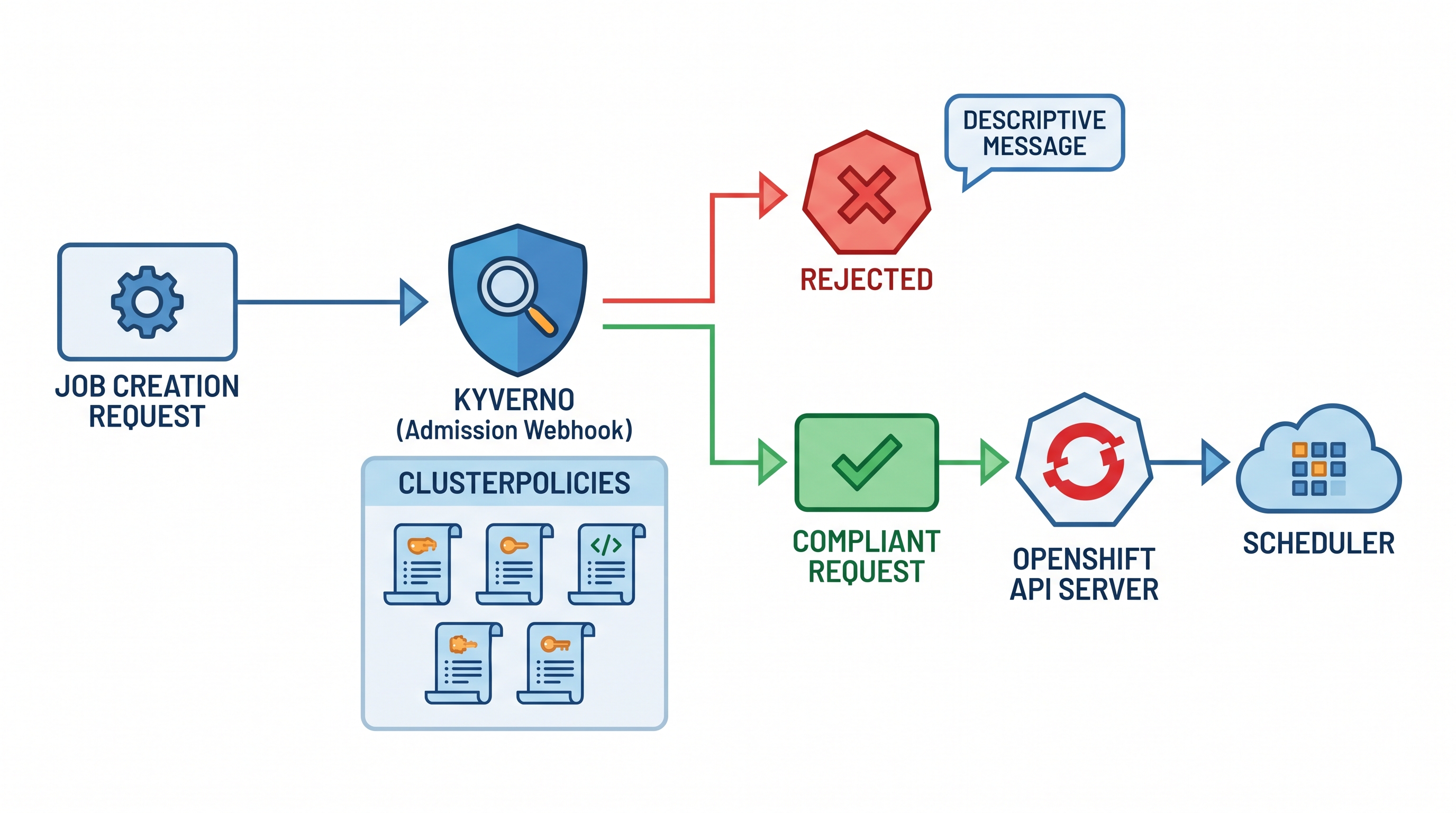
Kyverno solved it cleanly: a mutating ClusterPolicy intercepts every Job creation at admission time and injects the missing security context fields — regardless of whether the Job came from Helm, Argo CD, or a Python BatchV1Api.create_namespaced_job call. One policy, all surfaces.
Worth saying explicitly: you could use Kyverno for all workloads in this chart instead of Helm templates. Let Helm render minimal specs and let Kyverno add security context everywhere. It’s a valid architecture — especially useful when you’re adopting a chart you don’t fully control. I chose Helm templates for standard Deployments because I wanted the chart to be self-contained and correct before it even reaches the cluster, and Kyverno for Jobs specifically because they’re the surface I couldn’t control at render time.
Helm templates enforce shape at render time. Kyverno enforces policy at admission time — meaning even a kubectl apply or a programmatic API call bypasses Helm, it still gets caught. For OpenShift environments where restricted-v2 compliance is non-negotiable, this distinction matters.
Kyverno’s own pods require a privileged PSA namespace. Set this via subchart values and a namespace manifest:
# infra: namespace manifest for Kyverno
apiVersion: v1
kind: Namespace
metadata:
  name: kyverno
  labels:
    pod-security.kubernetes.io/enforce: privileged
    pod-security.kubernetes.io/warn: privileged
Validating Policy: Enforce Non-Root on Jobs and CronJobs
This policy rejects any Job or CronJob that doesn’t explicitly set restricted-v2-compliant security requirements at admission time — including Jobs submitted outside your GitOps flow.
apiVersion: kyverno.io/v1
kind: ClusterPolicy
metadata:
  name: require-job-restricted-v2
spec:
  validationFailureAction: Enforce
  background: true
  rules:
    - name: check-job-containers-non-root
      match:
        any:
          - resources:
              kinds:
                - Job
                - CronJob
      validate:
        message: >
          Jobs and CronJobs must set runAsNonRoot: true on the pod
          and allowPrivilegeEscalation: false + capabilities.drop ALL
          on every container.
        pattern:
          spec:
            template:
              spec:
                securityContext:
                  runAsNonRoot: true
                containers:
                  - securityContext:
                      allowPrivilegeEscalation: false
                      capabilities:
                        drop:
                          - ALL
Mutating Policy: Auto-Inject Security Context Into Jobs
For incremental migrations where you can’t fix every chart at once, a mutating policy provides a safety net. The +(key): syntax adds the field only if absent — it won’t overwrite values already set.
apiVersion: kyverno.io/v1
kind: ClusterPolicy
metadata:
  name: inject-job-security-context
spec:
  rules:
    - name: inject-pod-security-context
      match:
        any:
          - resources:
              kinds:
                - Job
              namespaceSelector:
                matchLabels:
                  app.kubernetes.io/managed-by: opa-platform
      mutate:
        patchStrategicMerge:
          spec:
            template:
              spec:
                +(securityContext):
                  runAsNonRoot: true
                  seccompProfile:
                    type: RuntimeDefault
                containers:
                  - (name): "*"
                    +(securityContext):
                      allowPrivilegeEscalation: false
                      capabilities:
                        drop:
                          - ALL
Validating Policy: Enforce Internal Image Registry for Jobs
On OpenShift, pulling from Docker Hub is often blocked at the network level — giving you a cryptic ImagePullBackOff. A Kyverno policy surfaces the violation at admission time with a clear message:
apiVersion: kyverno.io/v1
kind: ClusterPolicy
metadata:
  name: require-approved-registry-for-jobs
spec:
  validationFailureAction: Enforce
  rules:
    - name: check-job-image-registry
      match:
        any:
          - resources:
              kinds:
                - Job
                - CronJob
      validate:
        message: >
          All Job and CronJob images must be pulled from the
          approved internal registry (registry.company.io).
        pattern:
          spec:
            template:
              spec:
                =(initContainers):
                  - image: "registry.company.io/*"
                containers:
                  - image: "registry.company.io/*"
Trade-off worth calling out: Mutating policies are convenient but can mask chart bugs. In production, prefer validating policies with
Enforceand use mutation only as a migration bridge or for third-party charts you don’t control.
Pattern 6: Value Composition — Argo CD Optional, Helm Hooks Always
Let me be upfront about something: Argo CD is not a requirement for this chart. Not every customer runs it, and the chart is explicitly designed to install cleanly with a plain helm upgrade --install. GitOps via Argo CD was my development and staging delivery choice — it raised the operational bar during development and let me iterate faster against real clusters. But the chart must work without it.
The way we handle ordering for both paths:
- Helm hooks (
helm.sh/hook: pre-install,pre-upgrade) manage sequencing for plain Helm installs — infra resources (namespace labels, secrets) are created before workload pods. - Argo CD sync waves (
argocd.argoproj.io/sync-wave) handle the same concern for GitOps customers. The sync wave annotation is added in the Helm library and rendered only when theargoCDflag is set in values, so non-Argo customers never see those annotations.
The value composition layer itself is pure Helm — the four-file overlay strategy works identically whether you’re doing helm upgrade from CI or syncing via an Argo CD Application.
The four value layers need to be applied in the correct order. In the Argo CD Application spec:
source:
  helm:
    valueFiles:
      - deployment/values.yaml
      - deployment/openshift/values.yaml
      - deployment/openshift/vendor/values.yaml
      - deployment/openshift/vendor/staging/values.yaml
Order is everything. The environment file is last and wins. If you get this wrong, your OpenShift security context values may be silently ignored.
Two things to watch in practice:
Sync order matters for bootstrapping. Image pull secrets must exist before any workload pod is scheduled. If ESO-produced secrets are in the same sync wave as your workloads, you get transient failures that are annoying to diagnose.
metadata:
  annotations:
    argocd.argoproj.io/sync-wave: "-1"  # infra resources sync before workloads
Deprecated overlays are a trap. If your repo has an old overlay directory that was the original source of truth, mark it deprecated explicitly and stop referencing it in your Application. Two teams reading different value files is a reliable path to a production incident.
Pattern 7: Kyverno as the Platform Adapter for Runtime-Created Jobs
The scheduler creates batch Jobs programmatically — at runtime, from Python code. The Job spec for each task type (Linta, PM-Connectors, Sensors) is built in job_creator.py: image, env vars, resource requests, imagePullSecrets, CA volumes. That is all the Python code knows about. It does not set securityContext. It does not know what platform it is running on.
The wrong fix would be adding if platform == "openshift": branches throughout the scheduler — one per field, per job type, growing every time OpenShift adds a new requirement. That couples application code to infrastructure concerns and turns every new SCC rule into a scheduler release.
The actual fix: let Kyverno complete what Python left out, at admission time.
Three ClusterPolicies handle the gap:
Security context injection — adds runAsNonRoot, allowPrivilegeEscalation: false, capabilities.drop: [ALL], and seccompProfile: RuntimeDefault to every scheduler-created Job pod. The +(key): syntax means it only adds fields that are absent — it won’t overwrite anything the application did set intentionally.
Job-type storage volumes — each job image type needs its own scratch volume. Rather than hard-coding these paths in Python, a mutating policy matches on the container image name and injects the right emptyDir volume and volumeMount:
# clusterpolicy-native-batch-jobs.yaml (excerpt)
rules:
  - name: add-linta-res-emptydir
    match:
      any:
        - resources:
            kinds: [Pod]
            selector:
              matchLabels:
                linearb.io/created-by: linearb-scheduler
    preconditions:
      all:
        - key: "{{ request.object.spec.containers[0].image }}"
          operator: Contains
          value: "linta:"
    mutate:
      patchStrategicMerge:
        spec:
          volumes:
            - name: linta-workdir
              emptyDir: {}
          containers:
            - (name): "*"
              volumeMounts:
                - name: linta-workdir
                  mountPath: /linta/res
The same policy has parallel rules for pm-connectors:* and sensors:* images. Each job type gets exactly the volumes it needs, matched by image, without any Python code knowing about it.
OpenShift /tmp restriction — OpenShift’s restricted-v2 makes the container root filesystem read-only, which breaks any library that writes to /tmp without an explicit mount. A separate policy injects a /tmp emptyDir on every Pod created by a batch/v1 Job in the release namespace:
# clusterpolicy-job-pod-tmp-mount.yaml (excerpt)
match:
  any:
    - resources:
        kinds: [Pod]
        selector:
          matchLabels:
            batch.kubernetes.io/job-name: "?*"   # any Job-owned Pod
mutate:
  patchStrategicMerge:
    spec:
      volumes:
        - name: tmp-dir
          emptyDir: {}
      containers:
        - (name): "*"
          volumeMounts:
            - name: tmp-dir
              mountPath: /tmp
The result: Python code stays focused on business logic. Platform compliance — security context, scratch volumes, /tmp — is owned by Kyverno policies deployed as part of the Helm chart. A new OpenShift requirement means a new or updated ClusterPolicy, not a scheduler code change and release.
The separation of concerns: Python owns what the job does. Kyverno owns how it runs on the platform. Neither knows about the other.

Patterns at a Glance
| # | Pattern | What it solves |
|---|---|---|
| 1 | Platform value layer (K8S_PLATFORM gate + dedicated overlay file) | Keeps OpenShift overrides in one place — no scattered conditionals across 20 templates |
| 2 | restricted-v2 security context helpers (libchart + UID range validation) | Explicit UID/GID allocation; enterprise clusters require predictable ranges, not random assignment |
| 3 | Runtime CA injection (init container + Secret, not entrypoint.sh) | CA lives in the cluster, not the image; survives customer PKI rotations and multi-cluster rollouts |
| 4 | Umbrella + library chart architecture | One fix in libchart propagates to all 10+ services; conditional subcharts for Kyverno and ESO |
| 5 | Kyverno ClusterPolicies (validating + mutating) | Enforces platform compliance at admission time — including for objects rendered outside Helm |
| 6 | Helm hooks + optional Argo CD sync waves | Chart installs cleanly with plain helm upgrade --install; GitOps customers get proper wave ordering |
| 7 | Kyverno as platform adapter for runtime-created Jobs | Python code owns business logic only; Kyverno injects security context, image-matched volumes, and /tmp at admission |
Conclusion
OpenShift’s security model is strict by design. That strictness has a cost: you cannot drop a standard Kubernetes Helm chart in and expect it to work. But the patterns that make charts OpenShift-compatible — platform value layers, library chart helpers, runtime CA injection, Kyverno enforcement, Helm-owned Job templates — also make them better charts on any platform.
The umbrella + library chart approach means you absorb OpenShift requirements once and propagate them everywhere. Kyverno means you enforce them at admission time, not just at render time — including for Jobs that the application creates dynamically at runtime. The value layer system means you can support multiple platforms and environments from a single chart. And separating platform compliance into Kyverno policies means your Python code stays focused on business logic, not on what version of OpenShift it’s running on.
The investment is upfront. The payoff is a chart suite you can hand to another team, deploy to a new environment, or update without fear — including when an enterprise customer hands you a list of requirements on a Tuesday afternoon.
Your turn: How do you handle OpenShift security constraints in your Helm charts? Do you push the compliance layer into Kyverno, bake it into library chart helpers, or take a different approach entirely? Drop a comment below — I’m genuinely curious how others are solving this, especially around batch workloads and runtime-created Jobs.
Discussion